
 5Likes
 LinkBack URL
 About LinkBacks
I can't understand how is possible this! I saw, connect only with FB.
Admins, please help me. I need to terminte my FB acc to and of this week. And i wanna keep ma team.
I use only and only laptop or PC. No more devices. THANK YOU!

 Thread: Delete FB acc?

I can't understand how is possible this! I saw, connect only with FB.
Admins, please help me. I need to terminte my FB acc to and of this week. And i wanna keep ma team.
I use only and only laptop or PC. No more devices. THANK YOU!
Last edited by Didier_Drogba; 01-10-2017 at 08:38 PM.
League Champ: 10 times
Vice: 5
Champions L: 3 times
Vice: 1
Cup Winner: 13 times
Vice: 7
League winner seasons: 2,16,26,28,35,38,44,45,56,57
Champ. league winner: 8,17,48
Cup winner: 5,6,11,12,15,16,19,20,22,23,24,25
If you have G a/c, I think still you can play using PC; just follow what Jeeves said (setting).Originally Posted by Didier_Drogba

Edit: sorry, I was wrong, I think only FB by PC.
Last edited by ibangali; 01-11-2017 at 04:10 AM.
Yo man, i try to do this waht a say Jeeves
but, can't find a point 2
League Champ: 10 times
Vice: 5
Champions L: 3 times
Vice: 1
Cup Winner: 13 times
Vice: 7
League winner seasons: 2,16,26,28,35,38,44,45,56,57
Champ. league winner: 8,17,48
Cup winner: 5,6,11,12,15,16,19,20,22,23,24,25
Do you have Google Play Games installed on your device?
Manager of Παναθηναϊκός Α.Ο (Panathinaikos A.O) currently playing at level 18.
Oh, I didn't see you play only on PC. You can't play Top Eleven without Facebook account on PC.
Manager of Παναθηναϊκός Α.Ο (Panathinaikos A.O) currently playing at level 18.
Thanks mate, in this case i can say only thank you, sorry but i need to terminate my FB acc and will lost my team who i develop from
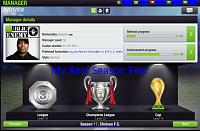
League Champ: 10 times
Vice: 5
Champions L: 3 times
Vice: 1
Cup Winner: 13 times
Vice: 7
League winner seasons: 2,16,26,28,35,38,44,45,56,57
Champ. league winner: 8,17,48
Cup winner: 5,6,11,12,15,16,19,20,22,23,24,25
Just delete all your friends, make your profile private so no one can search and find you and just keep it to play the game only.
Pretty simple solution
Manager of Παναθηναϊκός Α.Ο (Panathinaikos A.O) currently playing at level 18.

 Reply With Quote


