
 5Likes
 LinkBack URL
 About LinkBacks
Windows 7 HPOriginally Posted by khris

Intel (R) Core i5-2320 @3.00Ghz
8.00 Gb RAM
AMD Radeon HD7350 4Gb
Khris, you started this post on 10-08-2016, 11:53 AM, how do you solve yours please.
Today when I training error comes several times

 Thread: Low memory

Windows 7 HP
Intel (R) Core i5-2320 @3.00Ghz
8.00 Gb RAM
AMD Radeon HD7350 4Gb
Khris, you started this post on 10-08-2016, 11:53 AM, how do you solve yours please.
Today when I training error comes several times
Ok I'm pissed now I was betting on a player in auction and I just lost more than 10 tokens because this message popped up "Top Eleven is low on memory Please reload the game or contact support". and I reload and i've lost my tokens and the player too
Michael013, how I feel your pain...
the truth is that I do not have the problem.... xD is so, so strange, you have +5gb ram than me, better cpu..... lets say "better all"... I just notice that Ive the problem when I have more pages open....like youtube or so because the cpu is at 100% always with top eleven open and I imagine that more pages do a over saturation of all.......
I am thinking that maybe is related with the max. space we have assigned for the cache virtual memory.... ¿?
Can you try to do one thing?
Go to (for windows 7)
-Start -
-in Computer (mi pc¿? where you can see the HDDs units and so) don't enter) click right under -Computer- and go to -Properties-
Then to -Advanced Sistem configuration (left 4th option that need permission)
This open the side of Advanced options and 1st option is -Performance, visual effects ...etc and this side have a option of -Configuration-
This open a place where you see visual effects as 1st option, so go to -advanced options- side ( flange next to)
And here you can see the -virtual memory,- 3071mb in my case, if I click to -Change- here appear a place where say the assigned actually and recomended in my case recommend me 4606 and this would mean that if I do nto assign automatically the recommended (I have 3GB ram max not 4,6 )and assign it manually, I can put 4606 but this would mean use space in the HD,
Lets go for parts.... because some people with better PC than me can not play and this is for sure that something happen....
Then of course clean well the ventilator to keep the pc ok is basic, and then I have to say that to play I use the basic options of windows (even I can play in normal mode with the bars with effects) but using the "basic windows effects" too reduce the cpu consumption, then if is not something by default as memory assigned and so, maybe is the screen resolution/graphic card ¿?
So will be good if we try to check what happens with these pc's with 8GB ram that can not play....... and check means see more deeply the configuration to stablich min' requeriments in a more polite way... and when I say this, I say maybe "this will work" yeah? because I am not programmer and really, don't know from where the problem comes, I just try to see posibilities.... xD
What i think is TE is set in a way that we have to stay only at this when we play through pc just as the way we do in our smart devices, this problem reduces significantly if we don't open anything else at the same time in the pc...this is just so unwelcome cuz i can't stay just on the game all the time in the pc....
hrid (football wizards)

Ok now this is really getting annoying I can't even train my players now everytime I try to train my player this keeps popping up also my laptop has got enough memory and the resolution is fine too.
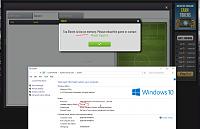
@Khris, I read your msg, sorry not get enough time to do what you ask but I'll do it soon; also look 2 screenshot very closely :
here another:
On the first screenshot, I just turn my pc on then run fb "gameroom", t11 not completely loaded yet but "low memory" error msg popup, then I open my task manager to see whats going on, as I read on t11 help FAQ that t11 need 2 Gb free memory space, but you can see on my screenshot over 3 GB free memory I have when that error msg popup, also only 1% cpu use and only 95 process running. I'm wondering what are the system requirements for t11? One more information about my internet speed, all I can say using same internet I can watch HD TV.
on my second screenshot, when I drag-drop drill it's freez but my computer doesn't freez, I have close that fb app then run again to play, its not once happening lot.
I hope game dev come and explain more this tech problem please.
thanks
#18
The game requires a minimum of 2 gigs of RAM at the moment.
I was thinking - Can you take a screenshot of the Processes tab as well? I want to see whats the RAM usage of Facebook's Gameroom?
I can see from your last screenshot that the total RAM usage for the computer was 3 gigs.
If you are still having the memory issue on the browser, you can try increasing the browser's allocated cache space. This is done differently depending on the browser you are using. What browser are you using.
Also check if the browser that you installed is a x32 bit or x64 bit. Usually when you go and download the installation file of a certain browser the website would automatically detect if your computer can run a x32 or x64 bit version of the browser, but just to be sure.
"If you are still having the memory issue on the browser, you can try increasing the browser's allocated cache space. "
This is more or less what I wanted to try 2 comments up, maybe is, because some managers have 8 gigas and can not play, a problem of space assigned by default (in cache terms or something related to the RAM usage ..¿?) , but I'm not an expert really in this xDDD :')
I have 16gb ram, and I got this message several times today.
Still this game is not touch pc friendly
Last edited by Gert Funck; 10-23-2016 at 10:20 AM.
__________________________________________________
Groundhog Day visiting level - 58 -
considering quitting, since nothing is improved for veterans ... nothing
FireCats is testing level - 36 -

 Reply With Quote


